Face and lighting
Choose a photo where you can clearly see both eyes and the outline of the face. Avoid sunglasses, strong shadows, heavy blur and a face turned far to one side. Compare the face during the close-up.
 Dime Dime BabyAI
Upload one adult photo, choose Dime Dime Baby, sign in and generate your video. Download the finished MP4 and add the BbY WOW sound in TikTok. This tutorial takes you through each step, including photo requirements and credits.
Create on this page ↗Your finished video will appear here.
Follow these controls with your own photo. The download screen shows the saved example; your personal video appears after your generation finishes.
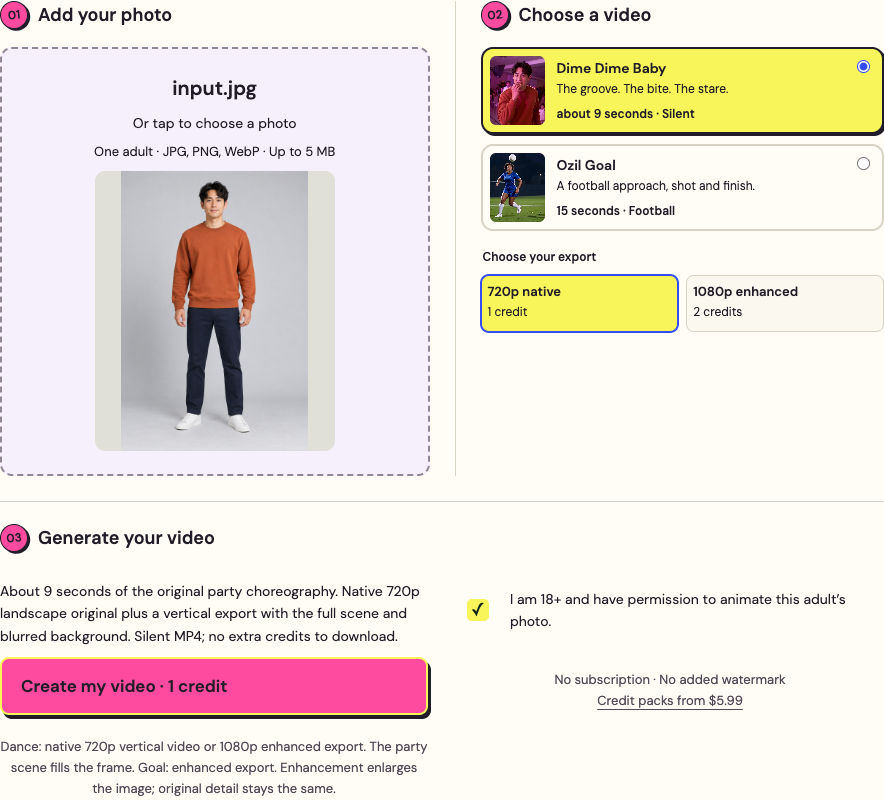
Select a clear adult photo and the party-dance preset. Check the export option and consent box.
Tap the image to enlarge ↗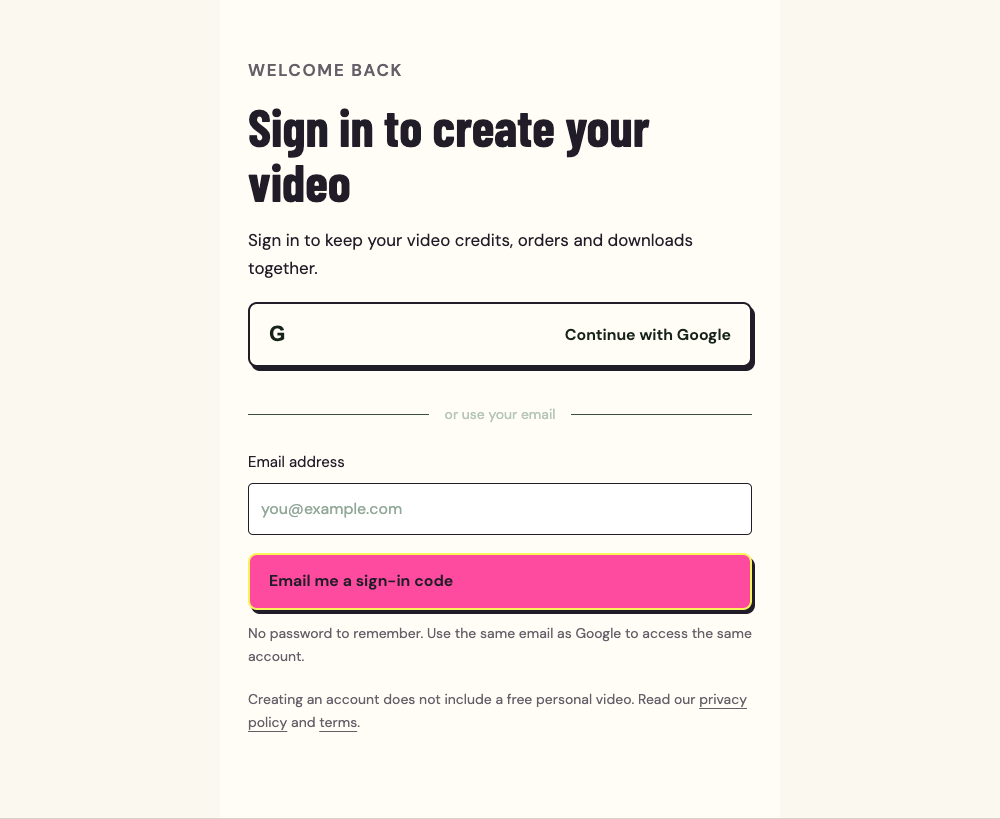
Choose Google or enter your email. After signing in, return to the creator and check your selected photo.
Tap the image to enlarge ↗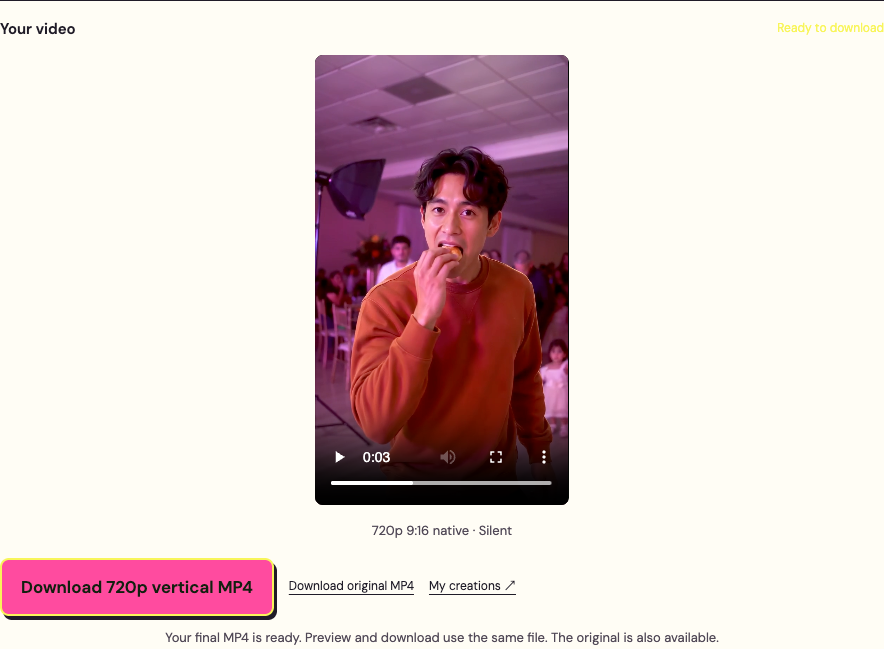
Watch the complete vertical result. Download the original 720p file, or prepare the 1080p option you selected.
Tap the image to enlarge ↗Buy credits if your balance is empty. A standard dance uses 1 credit. Check current packs, or add the sound after downloading.
Use one clear photo of yourself or another consenting adult. Keep the face, body, hands and feet visible. Upload JPG, PNG or WebP, up to 5 MB.
Choose a photo where you can clearly see both eyes and the outline of the face. Avoid sunglasses, strong shadows, heavy blur and a face turned far to one side. Compare the face during the close-up.
Leave space around the hands and shoes. A tight selfie leaves the body and outfit unclear. Use the clothes you want in the dance; the preset does not offer a separate wardrobe selector.
Use a photo with one intended dancer. This preset supports consenting adults. Pets, children and group-photo replacement are outside the current supported workflow. Check the complete Dime Dime Baby example before purchasing credits.
Check the movement, download format and sound separately. Keep the task ID for support.
Play the original MP4 and pause around the affected moment. Note the timestamp and task ID. For a severe visual defect, contact support within 7 days for review. Check the redo and refund conditions before paying to generate another version.
Yes. Earlier landscape results keep the original 16:9 file and their free blurred-background vertical option. New videos are generated directly in 9:16. Downloading an existing result does not create a new video or spend another credit.
The downloaded dance is silent. Add an available BbY WOW sound in TikTok or Reels, then adjust the selected audio segment while watching the approach, bite and turn. A sped-up remix may need different timing. Follow the sound guide before generating again.
Open your account and check the existing task. Processing time depends on the video service; this site does not promise a fixed wait. Avoid starting a duplicate while the first task is pending. A confirmed technical failure restores the credits used.
Download standard 720p directly, or keep the tab open while an enhanced file is prepared. If preparation cannot finish in your browser, use Download original MP4. Reopen finished tasks in your account and save downloads before they expire.
Return in the same browser and tab used for the upload. The temporary creation draft lasts 30 minutes. If it has expired or your browser could not keep it, choose the photo again and check the preset and export setting before creating. Keep the original photo on your device.
Start this Dime Dime Baby tutorial with one clear photo of yourself or a consenting adult. Use JPG, PNG or WebP up to 5 MB. Face the camera, keep hands and legs visible and avoid cropped shoes, sunglasses and group shots.
Upload your photo in the creator on this page and choose Dime Dime Baby. The dance reference is already set. Select standard 720p for 1 credit or enhanced 1080p for 2 credits. Both preserve the approximately 9-second dance sequence.
Use Google or email to sign in. If you need credits, choose a pack and press Buy credits, then continue with an available payment method. Return to the creator and check your restored photo, preset and export choice. Click Create my video once and follow the task status. If the page closes, open your account to find the task.
Watch the approach, concha bite, face and turn. Your native 9:16 video fills the vertical frame with the dancer and party. Download the original 720p MP4 directly. For enhanced 1080p, keep the tab open during preparation. The dance file is silent; add an available sound when you post. Save your video before the download window ends.
Start a new post and upload your downloaded video. Open the sound or audio picker and search for BbY WOW or Dime Dime Baby. Choose an available track, then adjust its starting point while previewing your video. Match the approach and concha bite to the chorus before checking the turn. If the timing feels off, adjust the audio segment rather than generating again. Sound options vary by account and region. Review the final video and apply the platform’s AI-generated label.
See the sound guide and visual timing cues →Keep the task ID and contact support for a severe face or movement defect within 7 days. If processing is delayed, check the existing task before trying again. A confirmed technical failure restores the credits used. This Dime Dime Baby tutorial uses the same refund policy as the generator.
1 credits
3 credits
10 credits
One-time packs. Standard: 1 credit. Enhanced 1080p: 2 credits. Full prices and terms
No. This Dime Dime Baby tutorial uses a preset dance sequence. Your photo is the only creative input required.
Yes. Open the site in a modern mobile browser, upload your photo and follow the steps. Keep the tab open to prepare an enhanced MP4.
The Dime Dime Baby tutorial and examples are free to view. Personal generation requires credits; a pack starts at $5.99.
Processing time varies with the video service. Follow the task status and check My videos if you leave the page. Avoid starting another task while the first is still processing.
Check which part of the sound is selected and whether it is a sped-up remix. Move the audio start point to match the approach and concha bite, then preview the whole clip. A different remix may require a different audio segment.
The preset uses the party scene shown in the example. Your uploaded adult photo guides the dancer’s appearance and clothing. The room behind you in the photo is not the requested setting for this dance.
No. Upload one adult photo; the preset supplies the movement reference. This Dime Dime Baby tutorial shows the upload, generation and download steps without asking you to record a dance or write a prompt.
No. New dance videos already arrive in native 9:16, and downloading the same result uses no extra generation credits. Older landscape results keep their original download and free blurred-background vertical option in your account.
Upload one adult photo. Choose your preset and preview the result before sharing.